
Version 2.0 of our Headless CMS/DAM/Site Builder is here with all the goodies.
Well, hello again internet. It hasn’t been quite as long this time. For those of you who didn’t catch the first post my name is Andy Weaver and I’m the Principal Architect at Fishbowl Solutions. I’ve spent over 20 years now (seriously) in the content management space and the Oracle ecosystem building solutions focused on content and information management.
When we launched CM Box, the idea was straightforward: give former OCM customers and WebCenter customers looking to build modern sites a fast, headless, structured site-building platform that didn’t make them choose between a clean content model, a real API, and a contribution experience their teams would actually use. That first release was about capability: a straightfoward migration path for the now extinct Oracle Content Management, and structured site building and content management.
Well, once customers started building real sites, with real teams, on real deadlines, the next question showed up almost immediately.
“Okay, but who’s allowed to change this?”
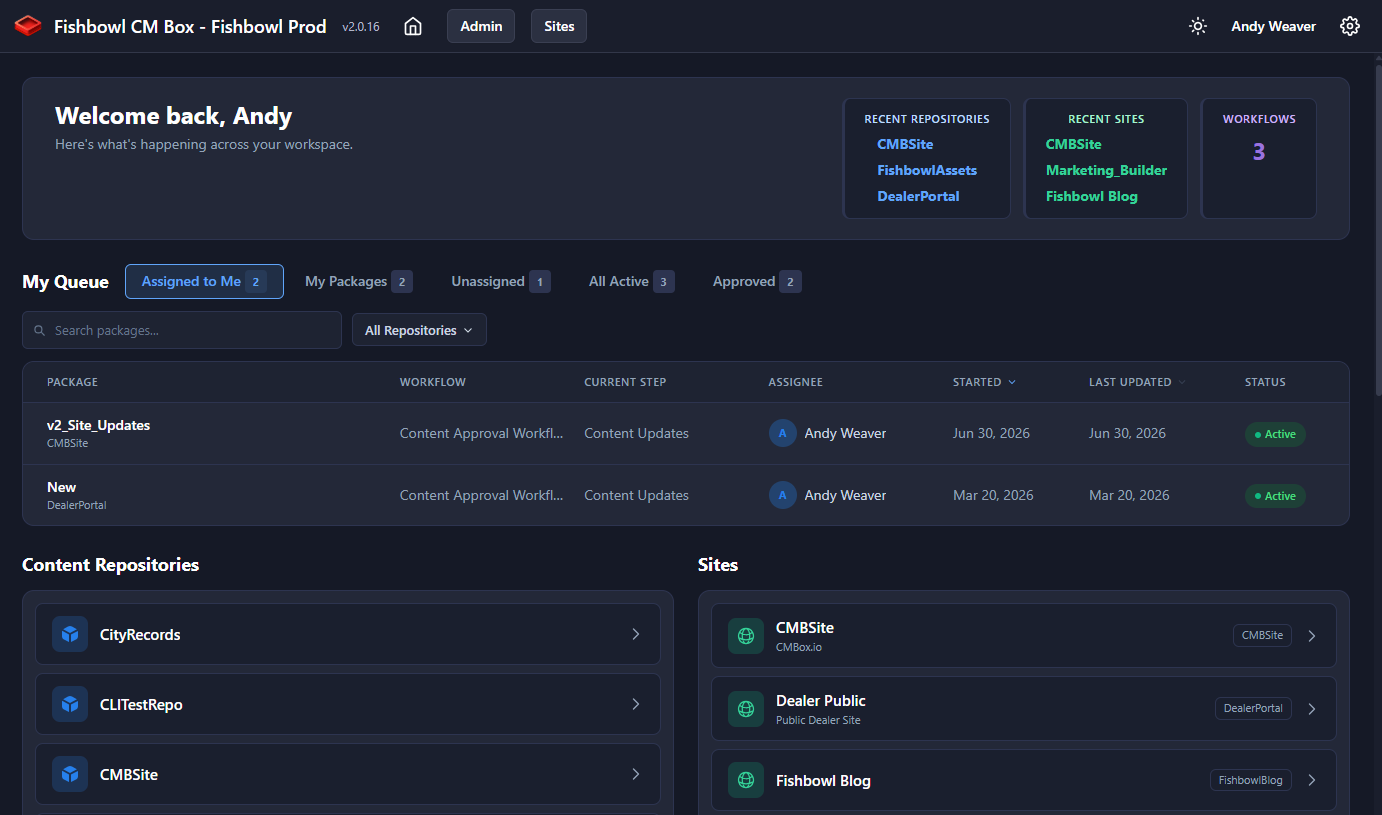
The redesigned CM Box 2.0 dashboard — your workflow tasks, front and center.
Here’s the thing about a platform that makes it easy to update a live website: it makes it easy to update a live website. That’s a feature right up until the moment a half-finished page, a typo in a press release, or a well-meaning change from someone who probably shouldn’t have had the keys ends up in front of your customers.
The teams running these sites kept telling us variations of the same thing. We love how fast this is. Now we need to slow it down, on purpose, in the right places. They needed to control who could touch what. They needed changes reviewed before they went live. They needed to see exactly what was about to change. And when an auditor or a brand manager asked “who changed this, and who approved it?”, they needed an answer that wasn’t a shrug.
So if 1.0 was about capability, 2.0 is about governance, giving you real control and a clear, accountable trail over how your sites and content get updated.
Packages — bundle it, review it, ship it as one thing
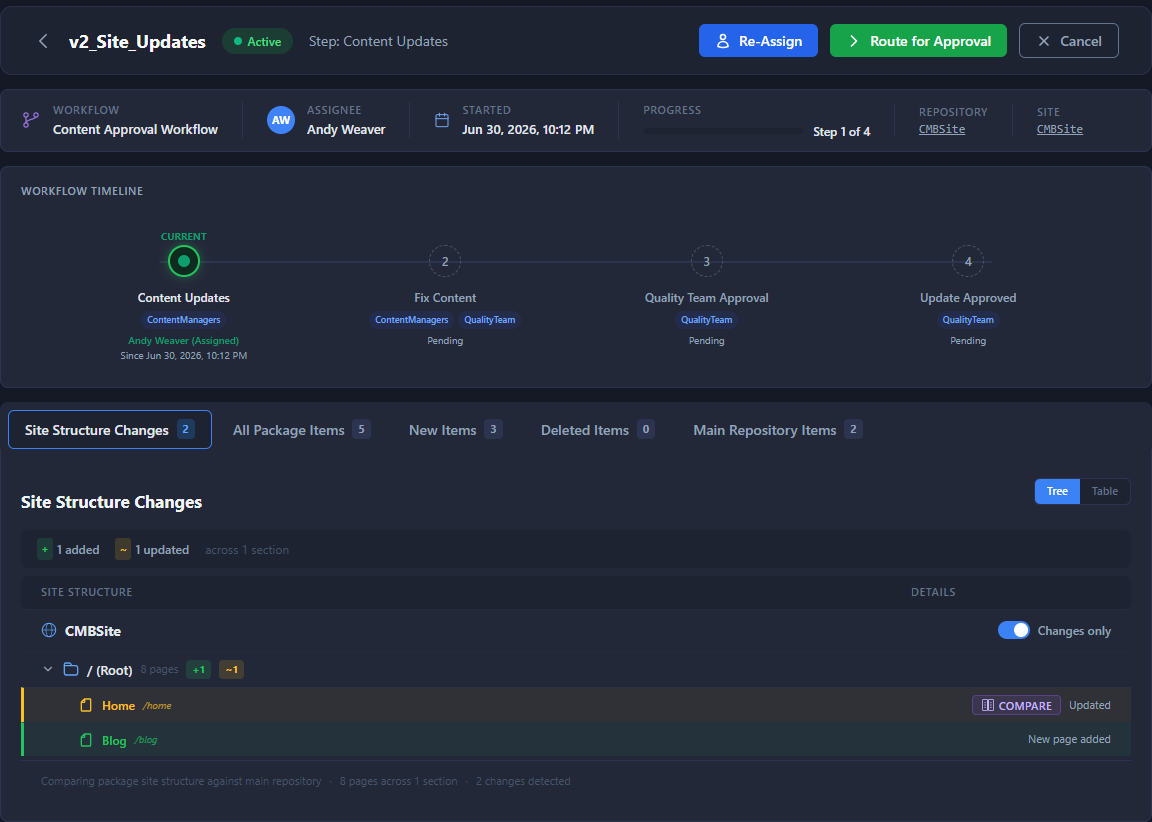
The Package Viewer shows exactly what’s inside a package — added, modified, and removed pages — before anything is merged.
The cornerstone of 2.0 is Packages and Workflow. A package is a reviewable bundle of site and asset changes that move through the system as a single unit instead of a scattered handful of individual edits. Packages have existed in CM Box since version 1.1 but they have been significantly enhanced and become the artifact that travels through an approval workflow (see below).
The problem packages solve is one anyone who’s shipped a real site update knows well: a meaningful change is almost never one thing. It’s a new landing page, plus the three articles it links to, plus the updated navigation, plus a couple of images. Shipping those one at a time means there’s always a window where the site is half-updated and inconsistent. Packages close that window. You assemble the related changes, review them together, and merge and publish them together.
A few things we’re particularly proud of:
- The Package Viewer gives reviewers a dedicated, tree-view visualization of exactly what a package contains — which pages were added, modified, or removed — before anything is merged. Site structure only shows up when a package actually contains a site, so asset-only packages stay clean and uncluttered.
- Auto-Package Rules let you automatically pull content into a package when it matches criteria you define, so bulk operations don’t turn into manual busywork and content that needs to be reviewed before publishing is forced to go through an approval workflow.
- Approve, merge, and publish in a single action. Once a package is reviewed and ready, it ships in one move — no juggling.
The benefit is simple: your site updates become atomic, intentional, and reviewable. No more “the page is live but the article it links to isn’t yet.”
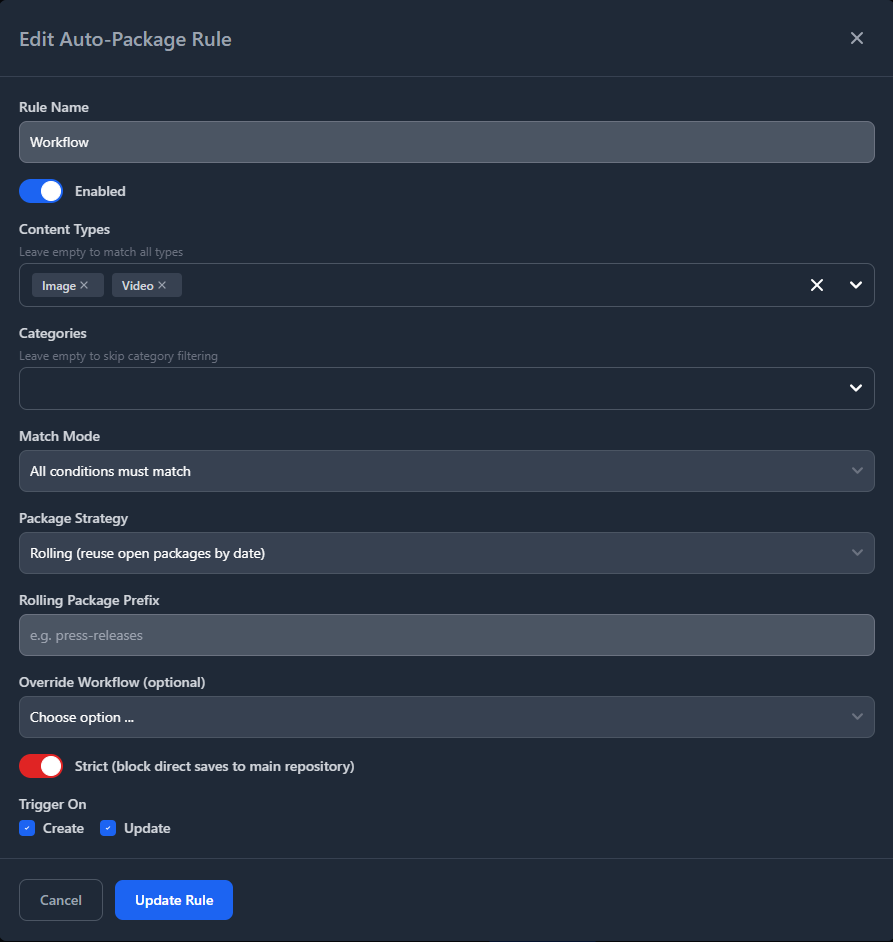
Auto-Package Rules pull matching content into a package automatically, so the right changes are forced through review instead of slipping out individually.
See exactly what will change — rendered, not raw
Reviewing a change is only useful if you can actually tell what changed. A wall of raw markup or a list of field IDs doesn’t tell a brand manager whether the homepage is about to look right.
So 2.0 introduces rendered page comparison. From inside a package, a reviewer can open a Compare on any site page and see a true before/after of the page as it will actually render — not the underlying source. Inserted content is highlighted as additions, removed content as deletions, drawn against the live preview of the page itself. For the technical readers out there this is meant to closely mimic how a code diff in git behaves.
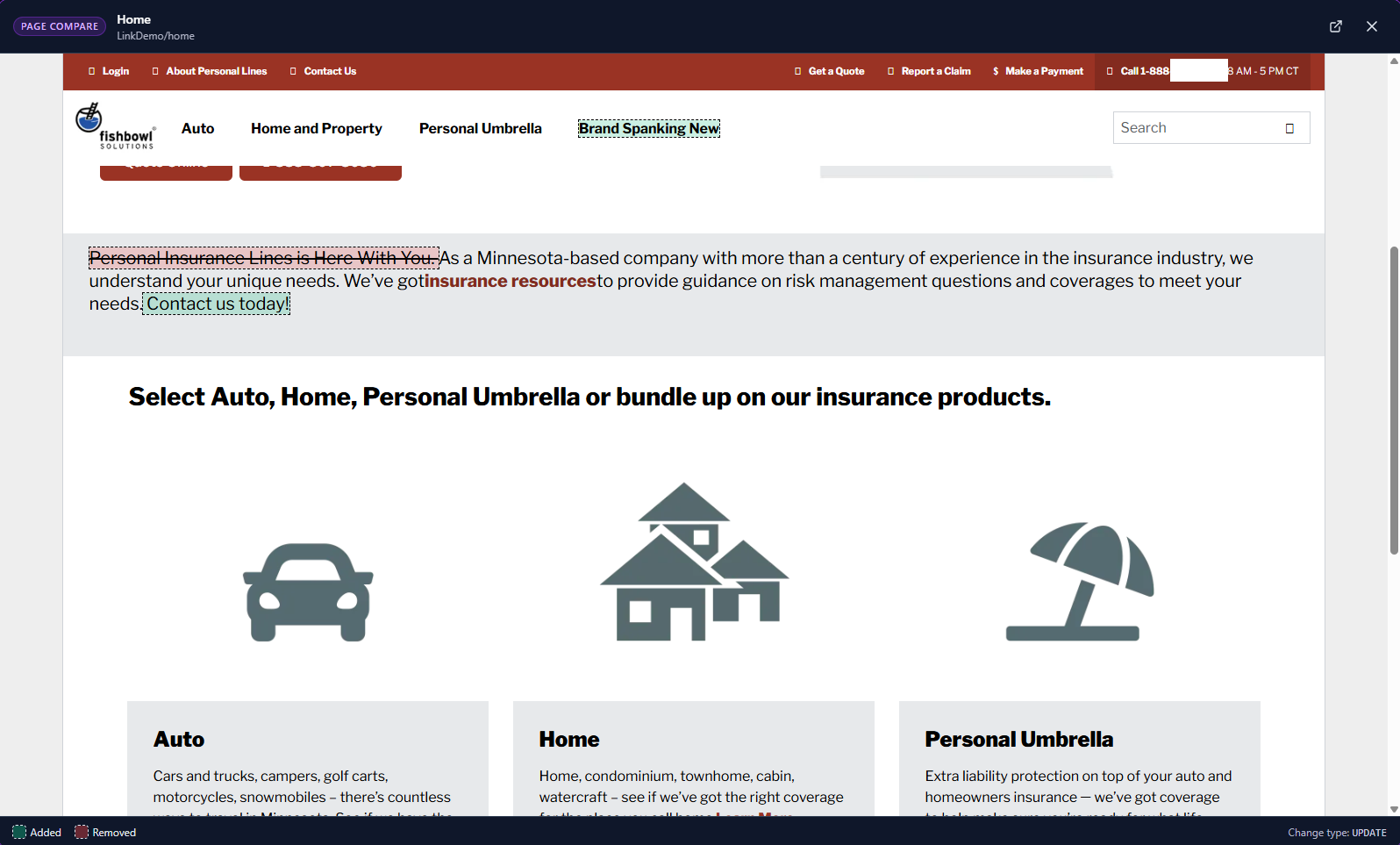
Rendered page comparison highlights what’s being added and removed — on the page as it will actually render, much like a Git diff
A couple of technical notes I think are worth calling out, because they’re the difference between a diff that’s useful and one that’s noise:
- We normalize build-specific markup — cache busters, package-preview prefixes, and the like — so the comparison surfaces only real content changes, not framework plumbing that shifts on every render.
- The merged result is cached briefly, so a reviewer can open and close the comparison repeatedly without paying the re-render cost each time.
One bit of honesty here, because I’d rather set the right expectation: this is a content comparison that shows you what text and elements were added or removed on the page. It’s not a pixel-level screenshot diff. It answers “what actually changed on this page?” clearly and confidently — which, it turns out, is the question reviewers are actually asking. It also allows a reviewer to check the interactive elements of a page, Accordions for example, to see if any content changed inside collapsed elements.
Workflow Engine Integration — review and approval that fits how you already work
Packages give you something to review. Workflow Engine Integration gives you the formal process to review it.
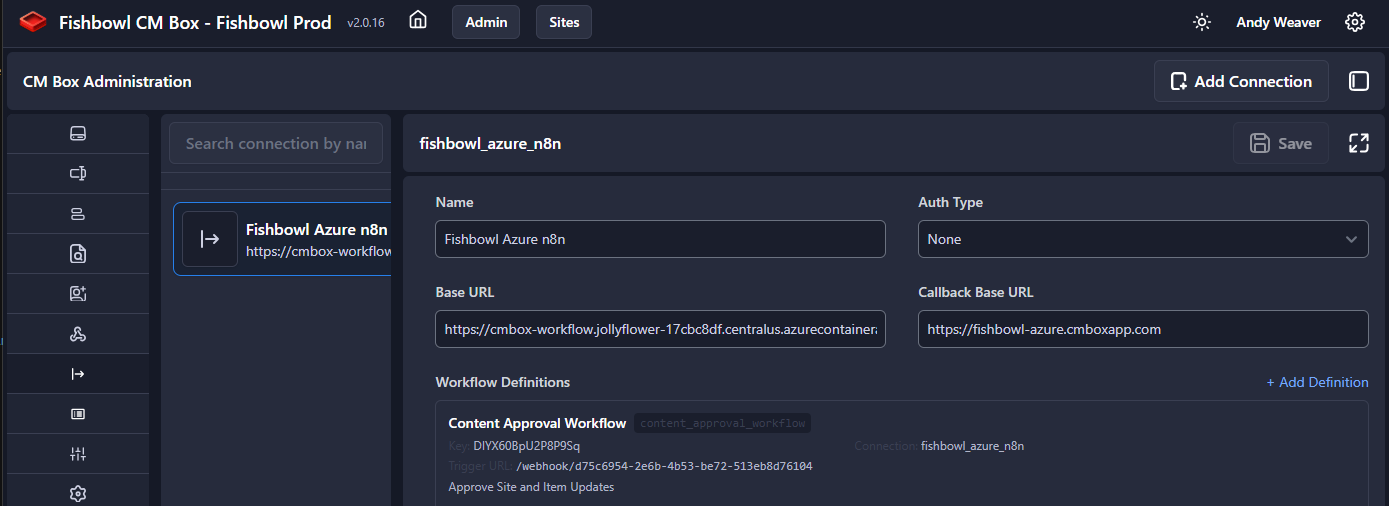
Configure connections to the external workflow engine of your choice, right from the admin panel.
2.0 integrates with external workflow engines so content can move through defined steps — draft → review → approved → published — with the right people signing off at each stage. You configure workflow connections to the external engine of your choice and definitions right from the admin panel, assign reviewers by user or by group, and track step-by-step progress with full history. Email notifications go out at each stage so nothing stalls in someone’s mental queue. Workflows can even trigger automatically when a package is created, so the governance process starts the moment the work does.
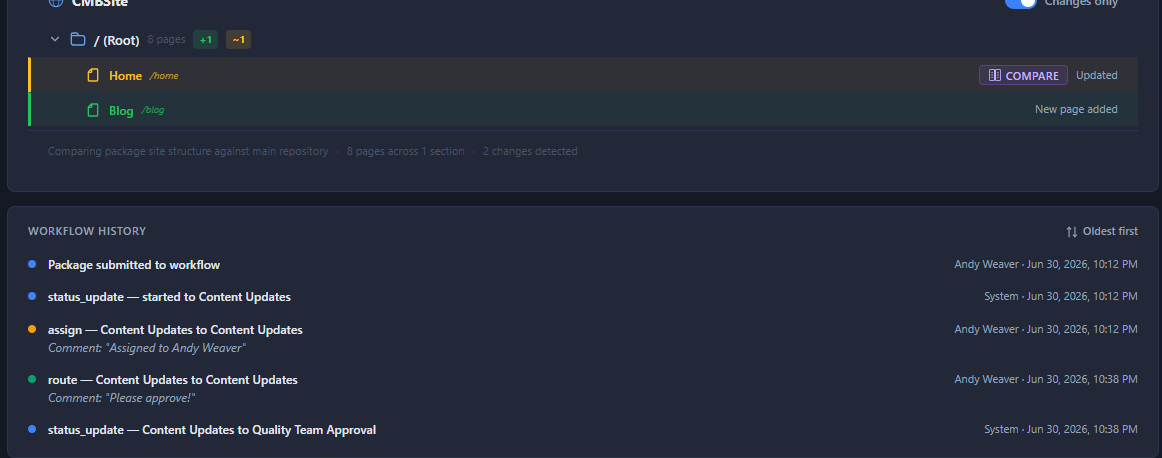
Every step is recorded with reviewer, action, and timestamp — a real audit trail for ‘who did what, and when?
For the architects and integrators in the audience, here’s how the integration actually works under the hood because the design goal was deliberately to keep it engine-agnostic. When a package is ready to enter governance, CM Box starts a flow by calling the engine’s start webhook, handing it the package context. The engine responds with the workflow details — the steps, the current state, the actions available — which CM Box records and surfaces in the dashboard. From there the engine owns the routing: it decides who the next reviewer is, sends out the email notifications, and as it advances it calls back into CM Box’s API to update the package’s state. Then it does the one thing that makes the whole dance work — it waits. The engine parks on a pending webhook while CM Box sits with the ball: a reviewer opens the package, looks at the rendered comparison, and takes an action (approve, reject, request changes). The moment they do, CM Box calls the engine back with that update, the engine un-parks, routes to the next step, and the cycle repeats until the flow resolves.
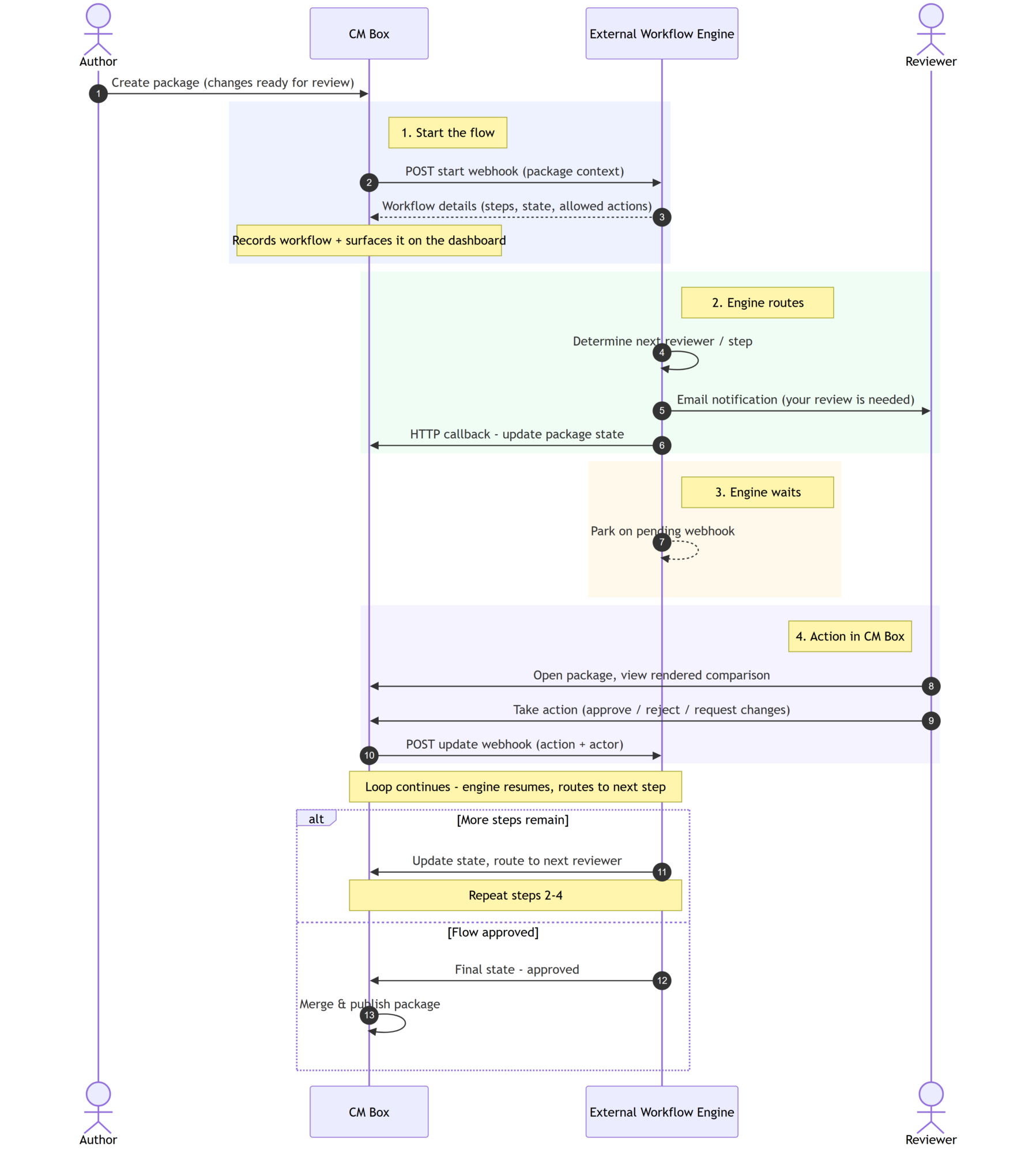
The engine-agnostic handshake: CM Box starts the flow, the engine routes and waits, and a reviewer’s action in CM Box resumes it
The advantage is that the bar for integration is extremely low: as long as your workflow engine can do three things — (1) start a flow via an inbound webhook, (2) make outbound HTTP calls, and (3) pause and wait for a webhook to resume a flow — it can drive governance in CM Box. If your engine can do those three things, it can integrate. No proprietary connector, no lock-in to a single vendor’s BPM product.
The benefit is the one our customers asked for by name: nothing goes live by accident. Changes can be required to pass through a formal review before they publish, every step is recorded, and when someone asks who did what and when, you have a real audit trail to point to. For any organization with compliance, brand, or editorial-standards obligations, this is the feature that turns “we hope the right people looked at this” into “we know they did, and here’s the record.”
Granular Security — the right access for the right people
All of the above assumes you can answer a more fundamental question: who’s allowed to do what in the first place? In 2.0, the answer got a lot more precise.
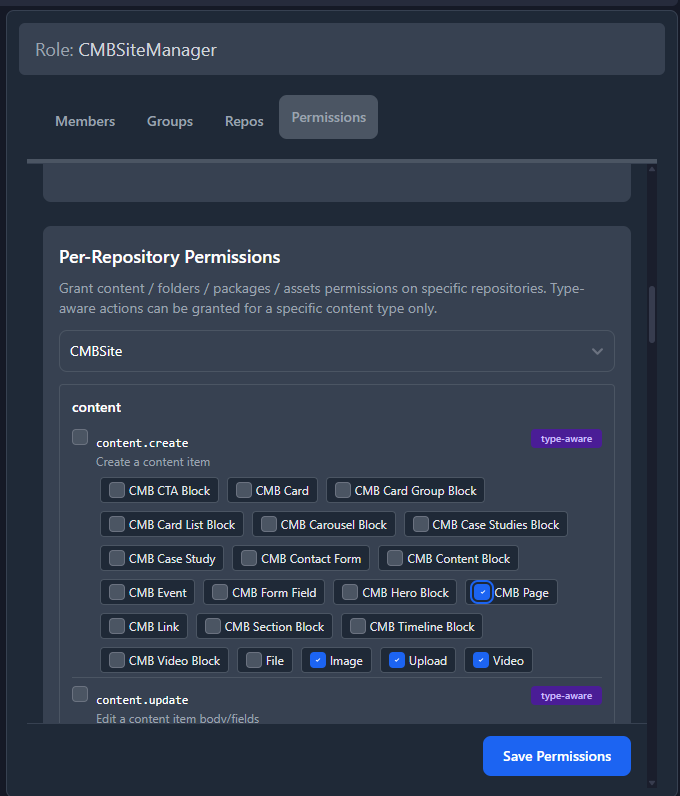
Granular permissions scoped to repository, site, and even individual content types — each person gets exactly the access their job needs.
We replaced the old coarse, all-or-nothing access checks with a proper granular permission model — fine-grained, namespaced permissions (think content.create, packages.merge, sites.publish) evaluated across three scopes: repository, site, and individual content type. The gates are wired consistently through the entire stack — the API, the application pages, and the UI all enforce the same model, and critically, they fail closed: if a permission is missing, the action is denied rather than quietly allowed.
A couple of design decisions worth surfacing for the technically inclined:
- Permissions are type-aware. You can grant
content.publishbroadly, or scope it down tocontent.publish:Press_Releaseso a regional team can publish press releases and nothing else. - Reusable permission bundles ship out of the box — Viewer, Content Contributor, Content Editor, Site Builder, Site Publisher, Package Author, Package Publisher, and the various admin roles — so you’re not assembling common roles permission-by-permission. (For the security architects among you: bundles grant globally, while the scoped role map lets you pin a role to a single repo or site. There’s a full permissions reference for the details.)
The benefit: you give each person exactly the access their job needs and nothing more. A contributor can draft but not publish. A regional team manages only its own site. And “who can touch what?” becomes a question with a clear, defensible answer.
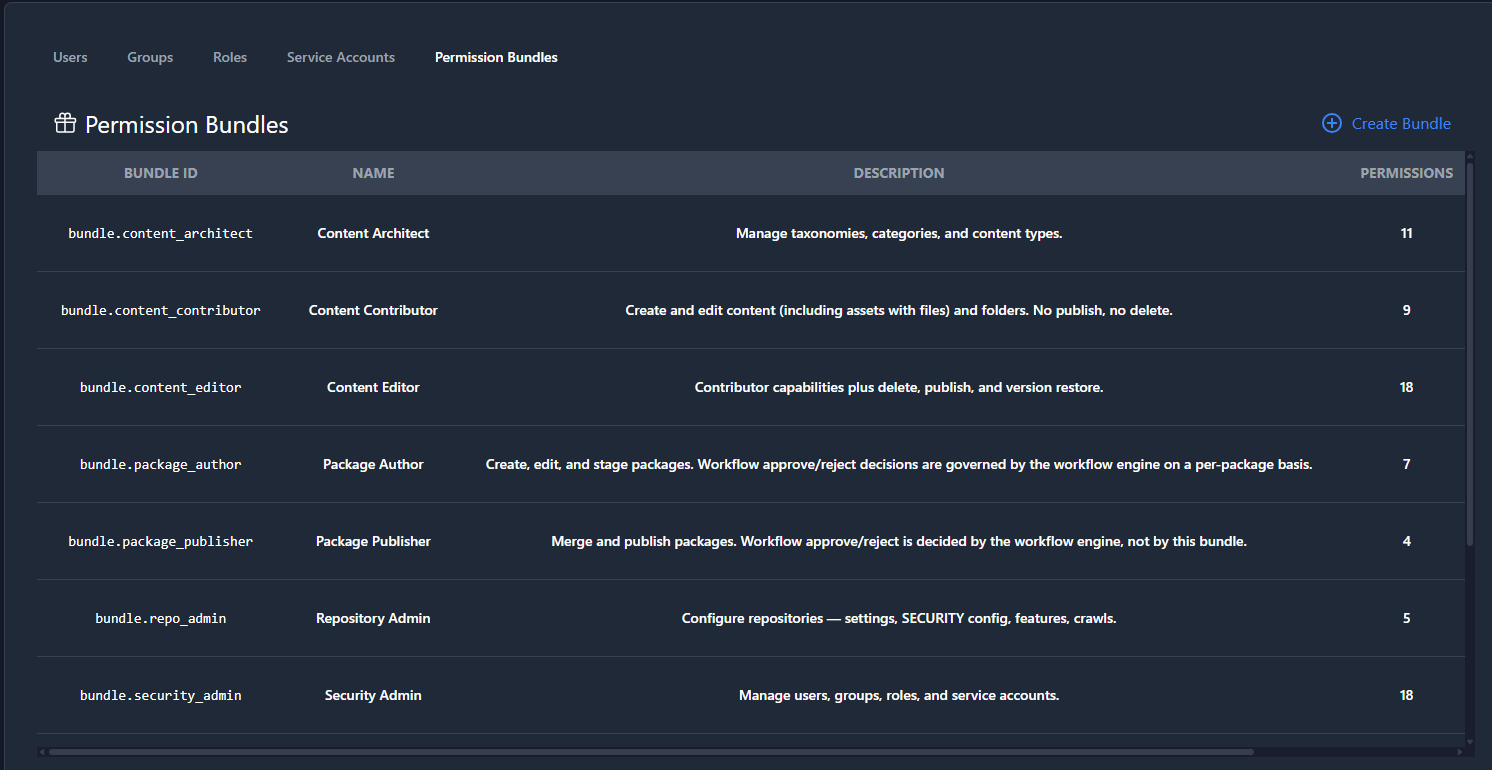
Reusable permission bundles ship out of the box, so common roles don’t have to be assembled permission by permission.
A redesigned interface — V2 UI
Governance features are only as good as the interface that surfaces them, so 2.0 ships a completely rebuilt contributor experience. The V2 UI is a modern split-pane layout with a new top navigation, resizable panels, and both grid and table views of your content.
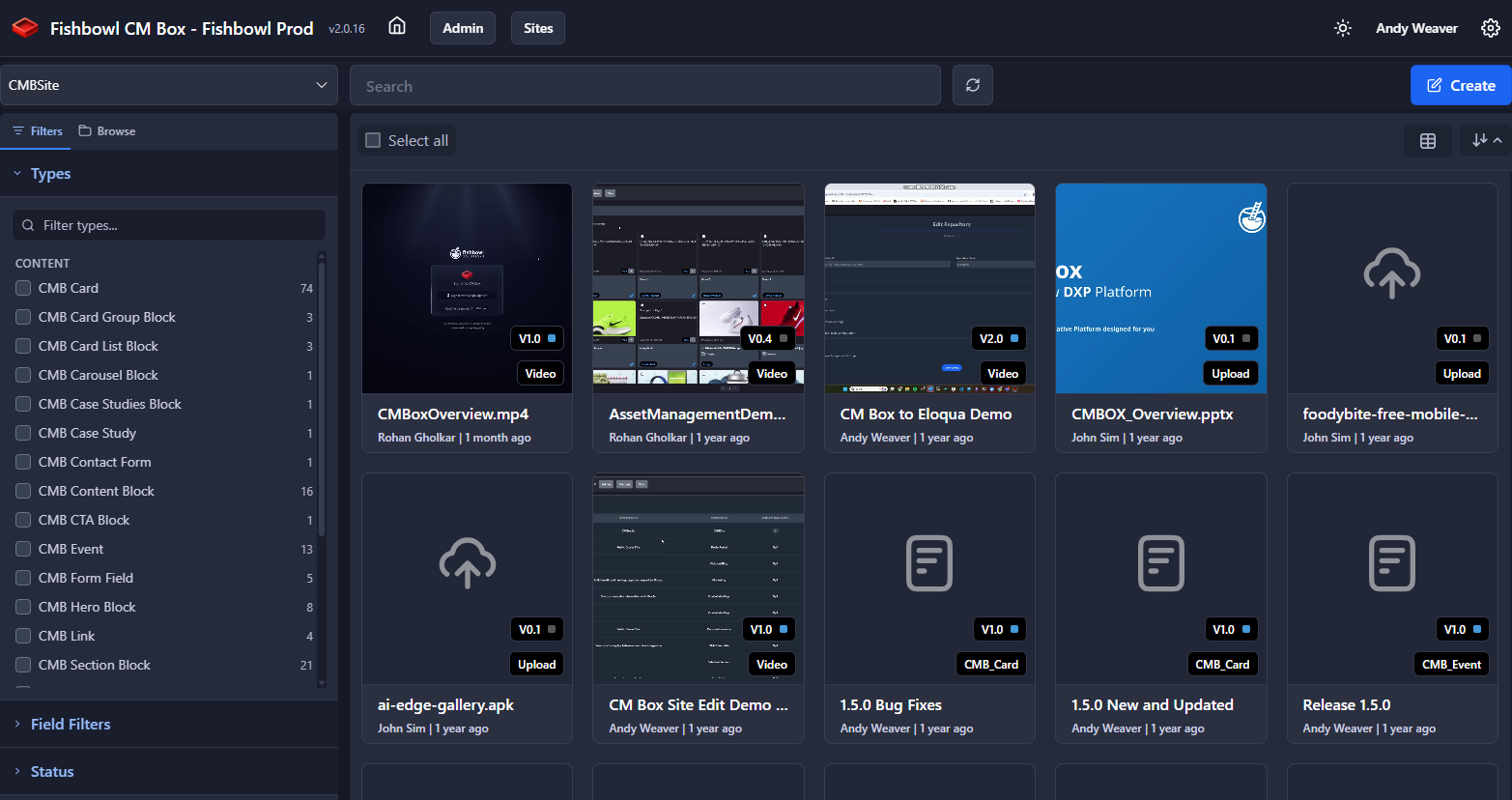
A polished dark theme by default, with a refined light theme — your choice, saved per user
The highlights:
- A polished dark theme by default, with a refined light theme for those who prefer it. Your choice is saved per user and persists across sessions — and we apply the theme during server-side rendering, so no more jarring light-mode flash when a dark-mode user loads the app.
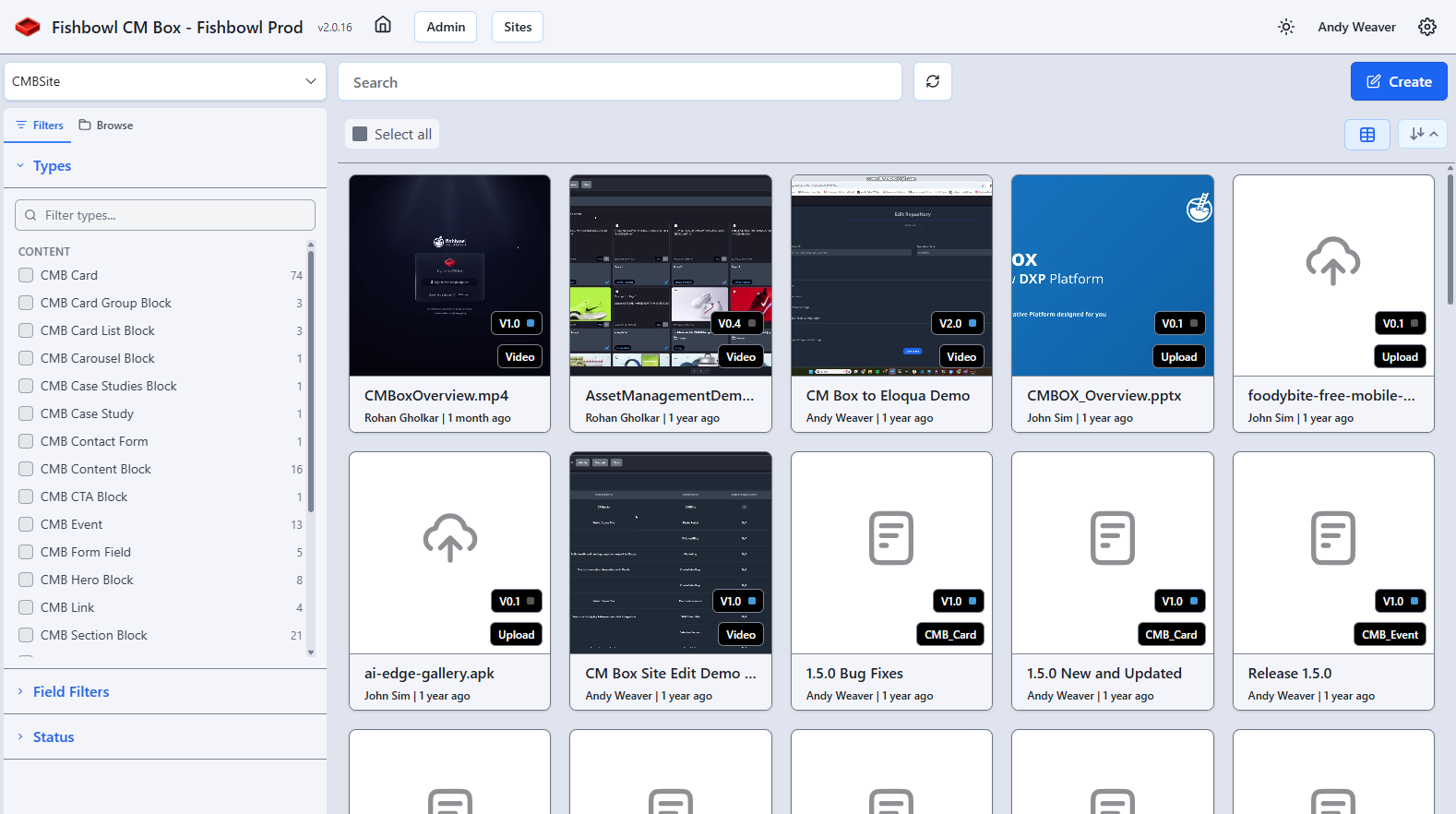
A polished dark theme by default, with a refined light theme — your choice, saved per user
- User preferences for default view mode, theme, and display settings, applied automatically on login.
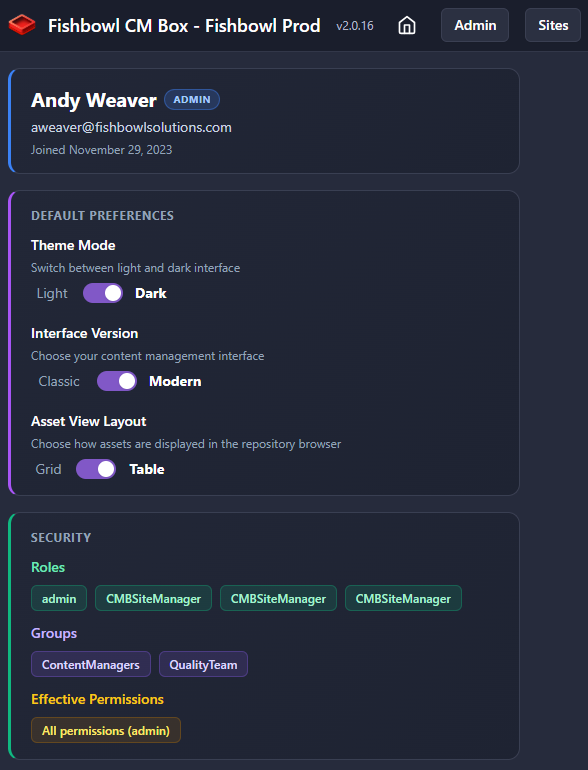
Set your default view and theme once — preferences apply automatically on login.
- A redesigned dashboard built around a filterable workflow task list, so you land on exactly the items that need your attention — including a dedicated tab for packages that are approved but not yet merged.
- A virtualized content grid that stays smooth even with thousands of items, a reworked filter panel with active-filter chips, and a sortable table view with configurable columns and multi-select.
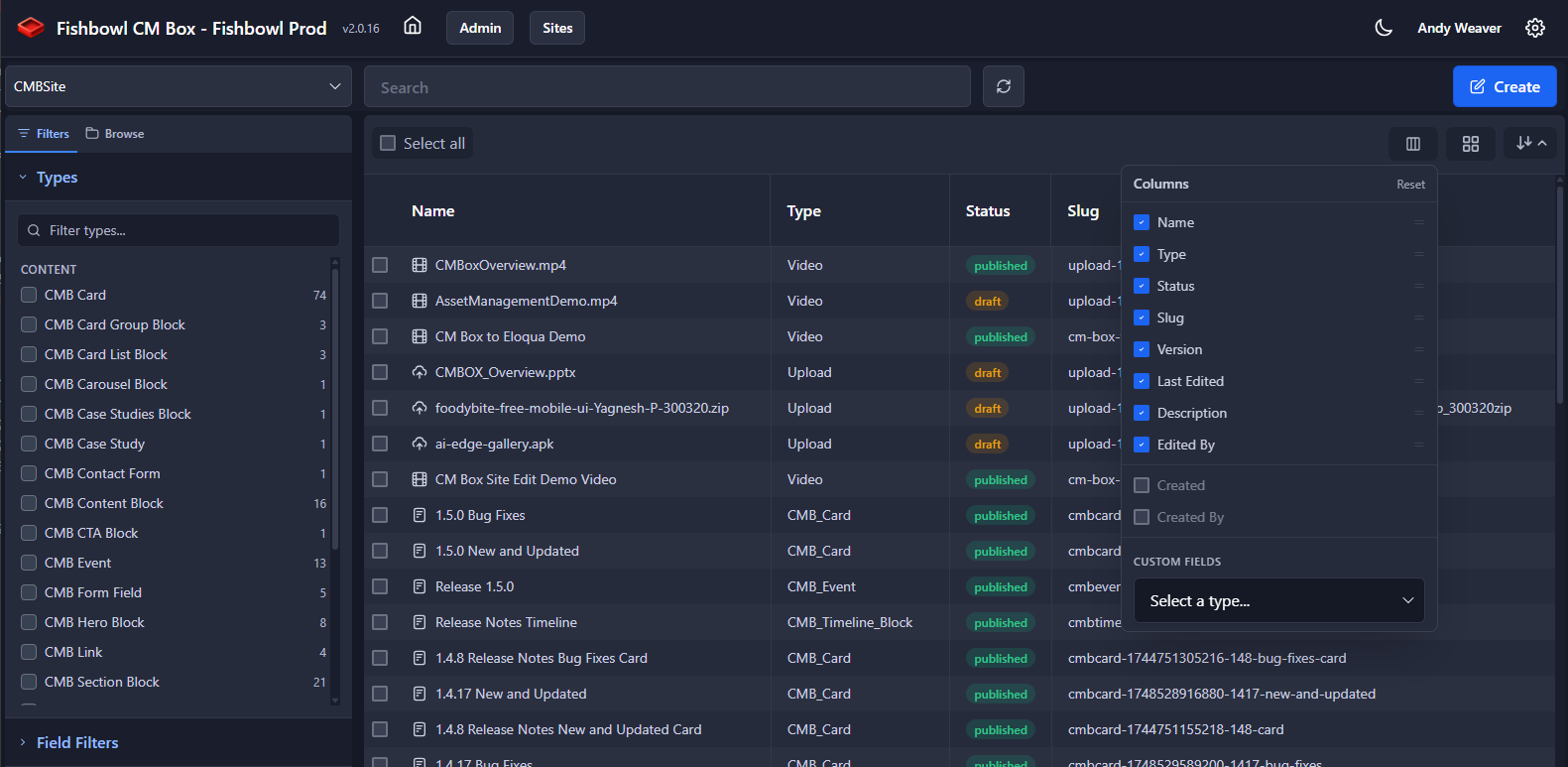
Prefer a table? Sortable columns, configurable widths, and multi-select are all built in.
And because we know “we redesigned everything” can be a scary sentence: the V2 UI lives alongside V1. Nothing was removed. Your team moves to the new experience at its own pace — there’s no forced switch. Be aware though, some of the new features only exist in the V2 UI.
The rest of what’s in the box
A release this size always carries more than the headlines. A few that deserve a mention:
- Auto Archive — content can be automatically archived on a schedule leveraging a system level field on every content item.
- Auto Publish — content can be automatically published on a schedule leveraging a system level field on every content item.
- Per-repository conversion settings — a new Conversions tab lets you turn individual renditions (thumbnails, transcodes, previews, storyboards, and more) on or off per repository instead of always generating every one. Disabling a rendition skips its generation and storage entirely, which means less background queue load and lower storage cost. We also stopped re-transcoding MP4s that are already H.264 — no sense doing work that’s already done.
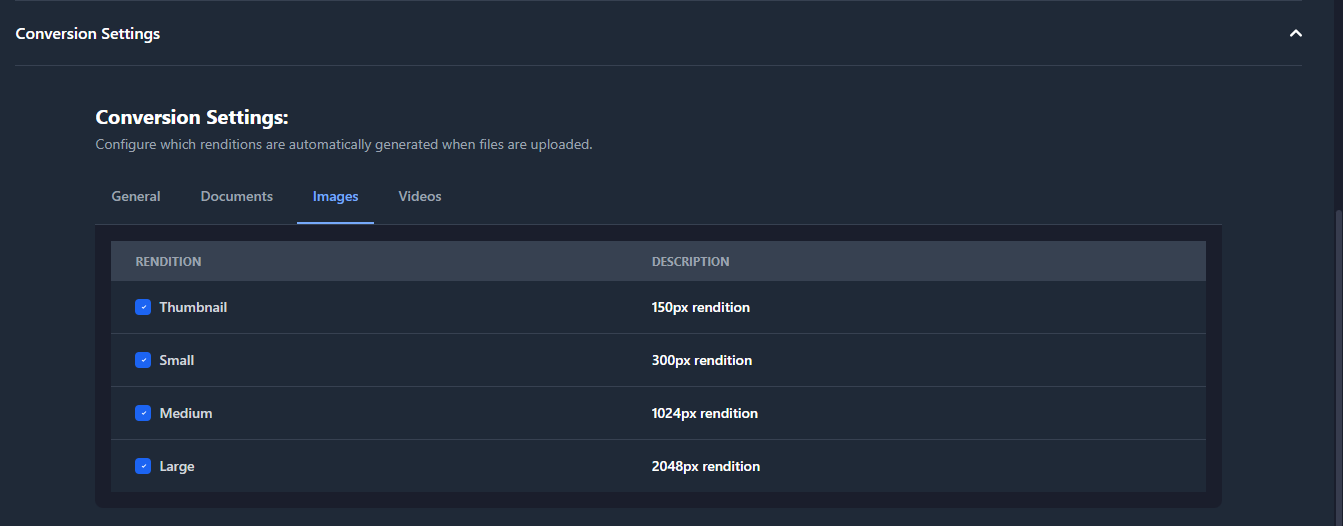
Turn individual renditions on or off per repository — skip what you don’t need and cut background queue load and storage cost.
- Streaming uploads — large media files now stream through to the supported cloud object storage instead of buffering in memory, which eliminates the timeouts and memory spikes that big files used to cause.
- Auto-generated API documentation at
/api-docs— every REST endpoint, documented from Zod-validated schemas, so integration is a lot less guesswork.
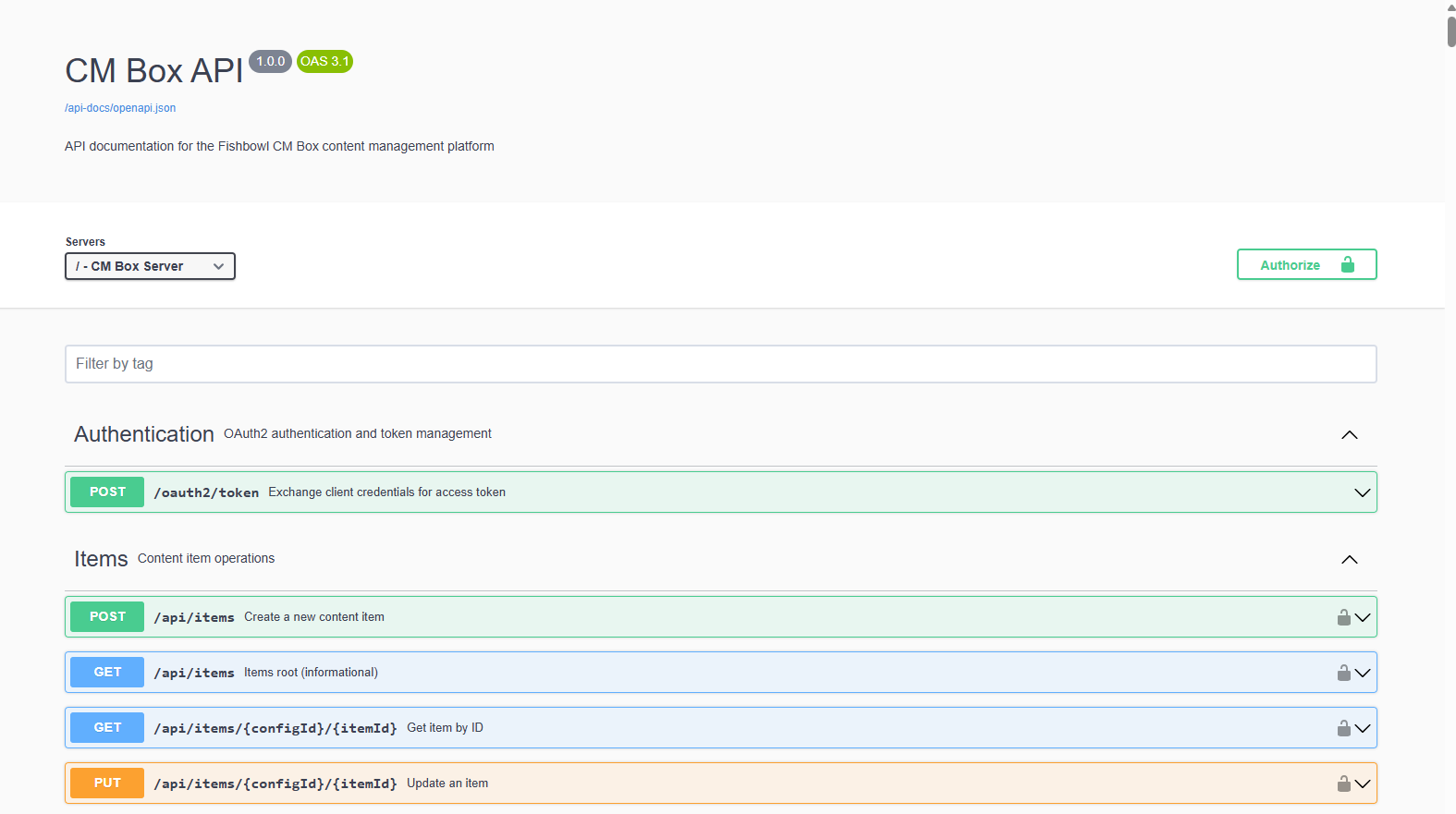
Every REST endpoint, auto-documented from Zod-validated schemas at `/api-docs`
Wrapping up
The first CM Box release answered “can we build modern, structured sites on top of WebCenter content?” Two-point-oh answers the question that comes right after: “can we do it responsibly — with the right people, the right reviews, and a record we can stand behind?”
Packages, rendered comparison, workflow-driven approval, and granular security are, to me, what take CM Box from a capable site-building tool to an enterprise content platform you can trust with a live, public-facing site and a real team behind it. And the V2 UI makes all of it something people actually enjoy using day to day.
A release this size doesn’t happen without a team that cares about getting the details right, and ours did. My sincere thanks to everyone at Fishbowl who put their work into 2.0 — and a special call-out to Rohan Gholkar, whose work on the V2 interface and the countless UI enhancements throughout this release is all over the experience you’ll be using day to day. This one is a genuine team effort, and I’m proud of what we shipped together.
For our existing customers, the upgrade is largely hands-off — the one conversation worth having is a quick “who can do what” review now that access is so much more precise, and we’re happy to walk you through it. The rest, as always, Fishbowl handles.
CM Box 2.0 is generally available now, and we’d love to talk to you about your site-building and structured-asset needs.
— Andy Weaver, Principal Architect, Fishbowl Solutions
Fishbowl Solutions • 4500 Park Glen Road, Suite 200 • Minneapolis, MN 55416 •
